# RASA X on Kubernetes cluster -\> How to add SpacyNLP with Helm
**URL:** https://forum.rasa.com/t/rasa-x-on-kubernetes-cluster-how-to-add-spacynlp-with-helm/28813
**Category:** \[Deprecated\] Rasa X Community Edition
**Created:** [May 13, 2020, 5:42pm UTC](https://forum.rasa.com/t/rasa-x-on-kubernetes-cluster-how-to-add-spacynlp-with-helm/28813 "2020-05-13T17:42:41Z")
**Posts on this page:** 9
**Page:** 1
### Author:  [@DROMZEE](https://forum.rasa.com/u/DROMZEE)
#### Post date: [May 13, 2020, 5:42pm UTC](https://forum.rasa.com/t/rasa-x-on-kubernetes-cluster-how-to-add-spacynlp-with-helm/28813/1 "2020-05-13T17:42:41Z")
Hi,
I deploy RASA X on Kubenetes (Cloud OVH) for create a french chatbot (student project).
The documentation is explicit for add Spacy model on RASA or on a local RASA X. But I can’t find the Helm commands for adding this Spacy french model (“fr\_core\_news\_sm”) on RASA X deployed on Kubernetes (and how add Spacy NLP in the pipeline )
- rasa-x version : “0.28.3”
---
### Author:  [@mloubser](https://forum.rasa.com/u/mloubser)
#### Post date: [May 14, 2020, 9:04pm UTC](https://forum.rasa.com/t/rasa-x-on-kubernetes-cluster-how-to-add-spacynlp-with-helm/28813/2 "2020-05-14T21:04:34Z")
HI @DROMZEE, to add a dependency to your Rasa node, you need to build an image based on Rasa e.g.
```auto
FROM rasa/rasa:1.10.0-full
RUN python -m spacy download fr_core_news_sm
RUN python -m spacy link fr fr_core_news_sm
```
Then you can update the helm charts to use your custom rasa image e.g. in values.yaml:
```auto
# rasa: Settings common for all Rasa containers
rasa:
# name of the Rasa image to use
name: "my/rasa_fr"
# tag refers to the Rasa image tag
tag: "latest" # Please check the README to see all locations which have to be updated for a rasa release)
```
Then you can refer to it in your config as
```auto
- name: "SpacyNLP"
model: "fr"
```
---
### Author:  [@wvalverde67](https://forum.rasa.com/u/wvalverde67)
#### Post date: [March 10, 2021, 12:18am UTC](https://forum.rasa.com/t/rasa-x-on-kubernetes-cluster-how-to-add-spacynlp-with-helm/28813/3 "2021-03-10T00:18:29Z")
Hello Melinda @mloubser
I just have finished the “Rasa Advanced Deployment Workshop” on UDEMY and I would like to use the Spanish library from SPACY. Using your previous instructions to DROMZEE I would like to know in which POD of the architecture has to install SPACY? Or may I have to use another one?
Thanks in advance!!!
---
### Author:  [@Johan1us](https://forum.rasa.com/u/Johan1us)
#### Post date: [March 10, 2021, 3:28pm UTC](https://forum.rasa.com/t/rasa-x-on-kubernetes-cluster-how-to-add-spacynlp-with-helm/28813/4 "2021-03-10T15:28:02Z")
Hi @wvalverde67,
I found myself with the same problem. What worked for me is the following:
# Locally
1. Make sure everything works locally, including spacy. I use spacy==3.0.3 incombination with nl-core-news-md.
2. Locally in the terminal do `pip freeze > requirements.txt`
3. Copy the content of this file to `actions/requirements-actions.txt`
4. Update your Dockerfile. Mine looks like this:

1. Update your docker-compose.yml. Mine looks like this:

1. Update your pipeline in config.yml for spacy==3.0.3

1. Push all of this to your github repo
# On your Google Cloud Platform:
1. Update your values.yml file. Mine looks like this:
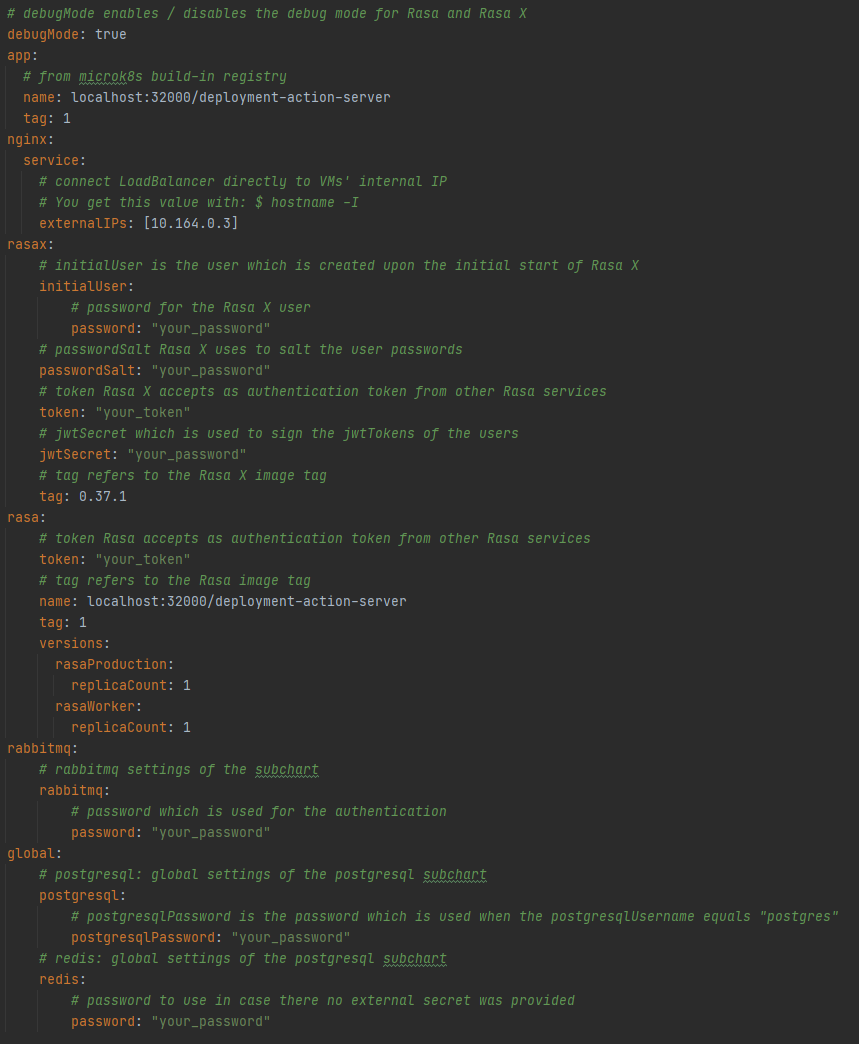
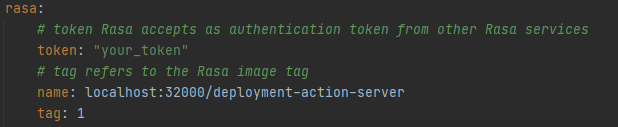
(I think this part is your solution. Here you tell rasaProduction and rasaWorker to use the same image as your action server.)
1. `git pull`
2. `sudo docker-compose build`
3. `sudo docker push localhost:32000/deployment-action-server:1`
4. `helm --namespace my-namespace upgrade --values values.yml my-release rasa-x/rasa-x`
Does this help?
---
### Author:  [@mloubser](https://forum.rasa.com/u/mloubser)
#### Post date: [March 10, 2021, 4:03pm UTC](https://forum.rasa.com/t/rasa-x-on-kubernetes-cluster-how-to-add-spacynlp-with-helm/28813/5 "2021-03-10T16:03:14Z")
Thanks for the details! that’s certainly one way to do it - the other is to have two custom images, one for your action server and one for Rasa only, and otherwise follow these instructions.
---
### Author:  [@wvalverde67](https://forum.rasa.com/u/wvalverde67)
#### Post date: [March 10, 2021, 4:09pm UTC](https://forum.rasa.com/t/rasa-x-on-kubernetes-cluster-how-to-add-spacynlp-with-helm/28813/6 "2021-03-10T16:09:03Z")
Hello, @Johan1us I really appreciate your help.
As I mentioned I’m new to K8s (microk8s), so I’d like to check again … in the same pod the instructor installed the action server I’m going to install SPACY? I thought Rasa Open Source was installed in another Pod … again thank you so much!!!
Pura Vida!!!
---
### Author:  [@wvalverde67](https://forum.rasa.com/u/wvalverde67)
#### Post date: [March 10, 2021, 4:13pm UTC](https://forum.rasa.com/t/rasa-x-on-kubernetes-cluster-how-to-add-spacynlp-with-helm/28813/7 "2021-03-10T16:13:35Z")
Hello @mloubser
If you have additional details will be more than welcome!!!
By the way … I am impressed and amazed by this K8s technology … but I’m a beginner!!!
Thanks in advance!!
---
### Author:  [@mloubser](https://forum.rasa.com/u/mloubser)
#### Post date: [March 11, 2021, 3:33pm UTC](https://forum.rasa.com/t/rasa-x-on-kubernetes-cluster-how-to-add-spacynlp-with-helm/28813/8 "2021-03-11T15:33:10Z")
What @Johan1us describes is using the same image for rasa and the action server. This has the advantage of only building one custom image, but it means your action server image becomes much larger, since usually it would only have `rasa_sdk` installed, not `rasa` and all its dependencies too.
This previous post [RASA X on Kubernetes cluster -\> How to add SpacyNLP with Helm - #2 by mloubser](http://forum.rasa.com/t/rasa-x-on-kubernetes-cluster-how-to-add-spacynlp-with-helm/28813/2) describes building a custom image only for rasa, not the action server. In this case, it is only the `rasa` pods that need the custom image. Both `rasa-production` and `rasa-worker` will read the settings under the `rasa` key in values.yml, so you should be good to use those instructions as a template for your use case.
---
### Author:  [@wvalverde67](https://forum.rasa.com/u/wvalverde67)
#### Post date: [March 11, 2021, 3:45pm UTC](https://forum.rasa.com/t/rasa-x-on-kubernetes-cluster-how-to-add-spacynlp-with-helm/28813/9 "2021-03-11T15:45:50Z")
Hi @mloubser I will follow your advice. Thank you so much for your support and all rasa team members!!!
Greetings!!!